

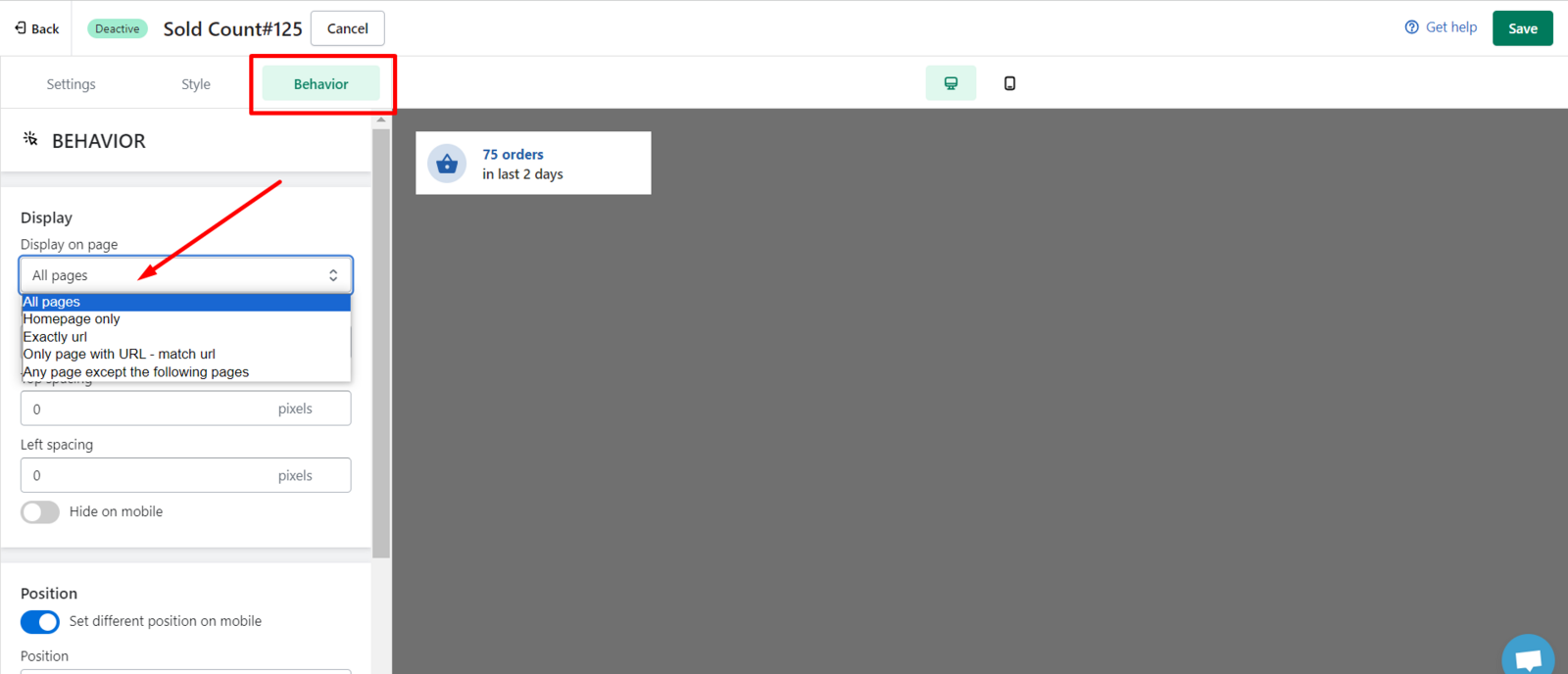
You can select pages to show your sold count on the Behavior page
-
All pages: show popup on every page on your store
-
Homepage only: show popup on homepage only
-
Exactly URL: paste the full and exact page URLs where to display your popup
-
Only pages with URL-match URL: you only need add the words after the shop domain. Our system will identify and match with URL having them.
-
Any pages except the following: you can exclude the popup on some specific page.
We value your feedback — it helps us continuously improve ForDeer and provide you with a better experience.
🖥️ Demo store: Check out here with password: 1
👉 Chat with us: Share your feedback directly with our team.
👉 Email us: hi@fordeercommerce.io
👉 Explore more apps: Discover more ForDeer apps.
👉 Join our community: Join ForDeer Community to get the latest updates, tips, and special deals.
🕐 Working hours: 8:30 AM – 5:00 PM (UTC+7), Monday–Friday.
We typically reply to live chats within minutes and emails within a few hours.
Need help? Feel free to reach out anytime via live chat or email!